Who covers what now
| Who | What they do now |
|---|---|
| SunStrong Management | Owner app and service for leases and PPAs. Sends cash and loan owners to third-party shops |
| SunStrong's shop list | Regional repair shops. "Does not endorse or warranty" them |
| SunPower Pro Connect | SunStrong's commissioning app. Needs a SunPower Pro account |
| Enphase | A paid gateway swap for SunPower owners, and an upgrade program for legacy micros |
Warranty questions: is a SunPower warranty still worth anything?
Before you roll a truck
Shops doing this well triage by phone first. Atma Energy in San Antonio troubleshoots on the call before sending anyone, and finished one job remotely (Solar Power World, July 2026).
Ask the owner:
- What color is the light on the gray SunPower box? Off, green, cyan, or amber.
- Does the app show panels, or just a total?
- When did the bill or the numbers change?
- Any roof work, new shade, or a power outage since?
Light colors decoded: the PVS6 lights and troubleshooting guide.
On site: read the gateway first
The PVS6 knows more about the roof than anyone's app. Plug into LAN1, log in with the last five characters of its serial, and read the device list.
- Meters in the list? If they're gone and every panel's power is blank, the gateway has hung. Power-cycle it.
- Every panel's
DATATIMErecent? A stale one among fresh neighbors is your suspect. - Suspect's DC volts and amps beside its neighbors'. Low amps, normal volts: light. Low volts: panel. DC fine, AC zero: micro.
Full steps: panel-level data on a system you didn't install. Patterns: SunPower microinverters not reporting.
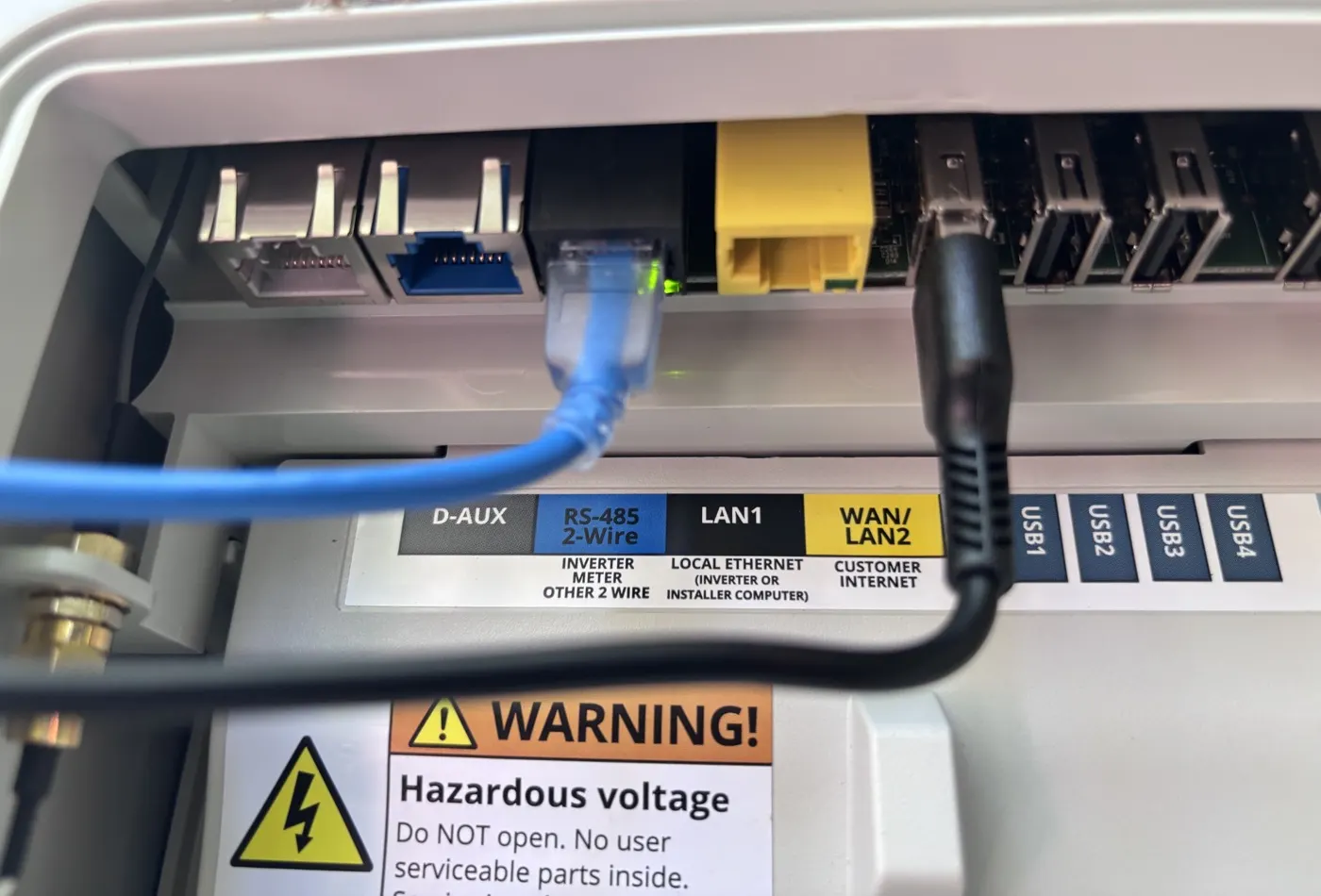
Parts
The device list's MODEL field gives the module type. Enphase lists the IQ7AS in SunPower A-Series modules and the IQ7XS in X-Series; Type H modules are listed with the IQ7HS. Older modules used SolarBridge micros, which Enphase's upgrade program replaces rather than repairs.
Prove the fix held
"Confirm production" at the end of a job is one moment. The owner judges you on the next month.
A swapped micro can come up and drop again, and a panel next to it can be the real fault. Look again after a few sunny days.
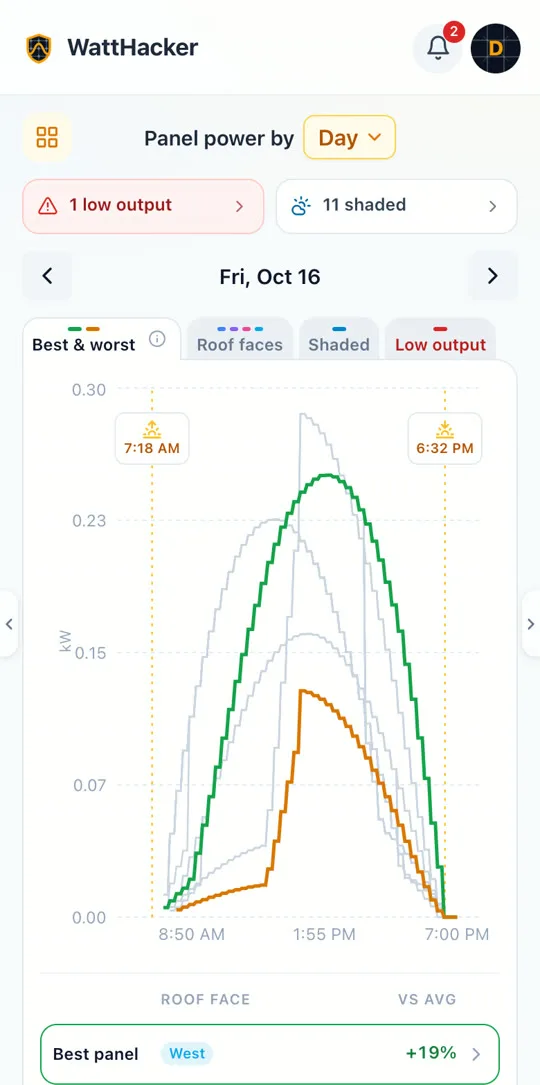
Or leave a monitor in the PVS6. It reads every panel every 2 minutes, alerts the owner when one stops, and the owner can share their panels with you, read-only, from the app.
Emporia and panel data: use both
Many shops already install an Emporia Vue, and for good reason: it's a great product, owners love the app, and the service is great. We use Emporia at home ourselves. It measures the whole home and each circuit, and with a CT on the solar circuit, the array's total production.
A total is the wrong tool for a panel fault. It adds every panel together, so a dead micro is a dip of a few percent with no name on it. Panel-level data names the panel.
Emporia for the home, panel data for the roof.
Turn the visit into a customer
Orphans call because nobody else answers. Some shops keep them with a yearly check: Green Power Energy in New Jersey runs an annual array-check plan, and its president calls it "good for recurring business with people who might need a new system eventually."
Watching every panel between visits gives that plan something to show.
Service SunPower systems? Let's talk.
We're signing up repair and service shops that want to see every panel on their customers' systems.
- Every panel, live, from the SunPower box already on the wall
- 5 minutes to install, no roof work
- Owners near you who need a pro, sent to you
Common questions
Who services SunPower systems now?
SunStrong Management services leases and PPAs. It sends cash and loan owners to third-party installers and repair shops, and lists some by region, without endorsing them.
Can a third-party installer get a SunPower Pro login?
SunPower Pro Connect, SunStrong's commissioning app, requires a SunPower Pro account. We haven't found a published way for a new shop to get one. A laptop on LAN1 reads the gateway without it.
What should I bring to a SunPower service call?
A laptop with an Ethernet cable, and an approved USB 2.0 Ethernet adapter for newer PVS6s with no jack. You'll need the last five characters of the gateway's serial to log in.
Can I replace a SunPower microinverter with an Enphase one?
Enphase's program for SunPower owners swaps the gateway for an Enphase one, and a separate upgrade program replaces legacy SolarBridge micros. Mixing parts under a PVS6 is not something we've seen documented.
How do I prove a repair worked?
Compare the repaired panel with its roof neighbors over several sunny days. A laptop shows one moment; a monitor left in the PVS6 shows the week.
 See every panel on your customers' roofs For solar service pros.
Service SunPower systems?
See WattHacker Pro Try the demo Back to home