
Our picks
Ranked for owners whose SunPower box still works: every panel, alerts while you're away, then 5-year cost. Lease? See #5. Box truly dead? See #6.
- WattHacker monitor: best overall · $75
- Sunflower: cheapest to start · $12/yr
- Solar Monitor: most private · $100
- Home Assistant: free, for the technical
- SunStrong Connect: best if you lease · $99.99/yr
- Enphase: best if your box has truly died · $999
We make #1, so weigh it with that in mind. None of the others are affiliated with us.
At a glance
| 5-year cost | History | |
|---|---|---|
| WattHacker | $75, or $199 | 7 days, or all |
| Sunflower | $60, or $110 | Needs Bridge |
| Solar Monitor | $100 | Daily totals |
| Home Assistant | $0 | All |
| SunStrong | about $500 | All |
| Enphase | $999 | All |
What you'd pay over 5 years to see every panel, if you own your system. WattHacker's $199 is Gigawatt: the monitor plus all your history. Every WattHacker order has a 30-day money-back guarantee. Sunflower: the app alone, or with its $49.99 Bridge. A lease includes SunStrong Premium. Enphase's is before its optional Enphase Care.
| Away from home | Watches for you | Panel alerts | |
|---|---|---|---|
| WattHacker | ✓ | ✓ | ✓ |
| Sunflower | – | – | – |
| Solar Monitor | ✕ | – | ✕ |
| Home Assistant | – | ✓ | – |
| SunStrong | ✓ | ✓ | ? |
| Enphase | ✓ | ✓ | ? |
✓ yes, – partly, ✕ no, ? we couldn't confirm. Sunflower needs its Bridge to work away from home or with the app closed.
| Phone app | Internet out | Money back | |
|---|---|---|---|
| WattHacker | ✓ | ✓ | 30 days |
| Sunflower | ✓ | ? | ? |
| Solar Monitor | ✕ | ✓ | ? |
| Home Assistant | ✓ | ✓ | n/a |
| SunStrong | ✓ | ? | – |
| Enphase | ✓ | ✓ | ? |
Internet out: keeps recording through a short internet outage and catches up after. Money back: a refund if it isn't for you; SunStrong generally refunds only annual plans, prorated, within 30 days. ✓ yes, – partly, ✕ no, ? we couldn't confirm.
| Published uptime | |
|---|---|
| WattHacker | 99.95% |
| Sunflower | Not published |
| Solar Monitor | Runs at home |
| Home Assistant | Runs at home |
| SunStrong | Not published |
| Enphase | Not published |
Uptime is the share of time the service worked. Ours is measured, October 27 to November 24, 2026; see it on our status page. Not published: no figure or status page on their site (checked November 25, 2026).
1. WattHacker monitor: best overall
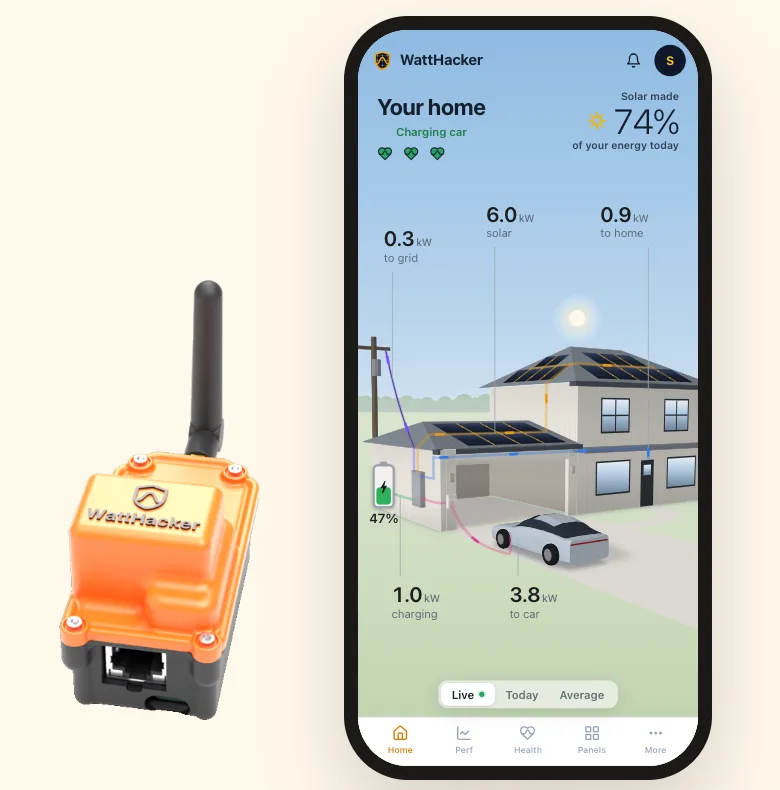
$75 or $199. No subscription.
A small box that plugs into your SunPower box, reads it every 2 minutes, and alerts your phone when a panel stops.
Pros
- Cheapest way to see every panel from anywhere, with no subscription
- Phone, text, or email alerts when a panel stops or falls behind
- Individual panel data and degradation tracking
- Cloud storage: access from anywhere
- Shade analysis
- Works with Powerwall, Rheem, and Emporia
- Plug in yourself, about 5 minutes
Cons
- $75 option stores 1 week of data
- Degradation tracking and Rheem control need the $199 option
Best for: owners who'd rather be told than have to check.
Learn more2. Sunflower: cheapest to start
$1.99/mo or $12/yr · Bridge $49.99
A phone app that reads your SunPower box over your Wi-Fi.
Pros
- Cheapest subscription here
- Every panel
- Or pay once: a $79.99 pass
Cons
- Records nothing with the app closed, unless you buy the Bridge
- The Bridge syncs every 30 minutes
Best for: a quick look at home, for the least money.
Learn more3. Solar Monitor: most private
$100 once · nothing after
A box from a one-person shop that shows your panels on your home network only.
Pros
- No account, no cloud
- Nothing leaves your house
- One price, ever
Cons
- Only works on your home Wi-Fi
- No alerts while you're away
Best for: privacy first, and you're home to glance at it.
Learn more4. Home Assistant: free, for the technical


Free · needs a home server
Open-source home software. The Enhanced SunPower integration reads your box.
Pros
- Costs nothing
- Reads current gateway firmware
- Can flag a failed panel
Cons
- You set up and run a home server
- Seeing it away from home is extra setup
Best for: people who already run Home Assistant.
Learn more5. SunStrong Connect: best if you lease
Free to look · $9.99/mo or $99.99/yr for every panel
The official app that replaced SunPower's.
Pros
- Nothing to buy or plug in
- Controls a SunVault battery
- Premium is included if you lease
Cons
- Each panel and all history cost extra if you own
- About $500 over 5 years
Best for: anyone who leases. You already have Premium.
Learn more6. Enphase: best if your box has truly died

$999 as of August 2026 · technician visit
Enphase removes your SunPower box and installs its own gateway.
Pros
- New hardware, from a company still in business
- Every panel
- Someone else does the work
Cons
- The most expensive option here
- Optional Enphase Care subscription on top
- Not for SunVault battery systems
Best for: a box that has truly failed. Most haven't: try ours first, with free returns for 30 days. All your options.
Learn moreConfirm current pricing with Enphase.
The bottom line
If you want to know a panel has stopped without checking, the WattHacker monitor wins: one payment, every panel, and an alert on your phone when one stops.
Want the cheapest look? Sunflower. Nothing leaving the house? Solar Monitor.
Prices checked November 17–18, 2026 (Enhanced SunPower November 5; Enphase as of August 2026). Confirm with each company.
Common questions
What is the best way to monitor SunPower panels?
For most owners, a monitor that plugs into the SunPower box and alerts your phone when a panel stops. We make one, the WattHacker monitor. Sunflower is the cheapest app, Solar Monitor keeps everything at home, Home Assistant is free if you run a home server, SunStrong is best if you lease, and Enphase replaces a box that has died.
Can I monitor SunPower panels for free?
Yes, if you run Home Assistant: the free Enhanced SunPower integration reads the gateway. SunStrong's free tier shows live production but not each panel. Every other option costs something once or every year.
What is the cheapest SunPower monitoring app?
Sunflower's app, at $1.99/mo or $12/yr. To keep history or see it away from home, it needs its $49.99 Bridge.
What if my SunPower PVS6 has died?
Usually it hasn't. Try a plug-in monitor first; ours has free returns for 30 days. None of the plug-in options can read a dead box. Enphase will replace it with its own gateway for $999 as of August 2026, with a technician visit; confirm current pricing with Enphase. Not available for SunVault battery systems, which Enphase's monitoring-restoration service explicitly excludes.
Which SunPower monitor alerts me when a panel fails?
WattHacker, on every plan: a phone notification, text, or email when a panel stops reporting for 48 hours or makes under half of what its roof neighbors make. Sunflower lists panel alerts too, but without its $49.99 Bridge it reads your system only while its app is open on your home Wi-Fi.
See your own panels, live.
See plans Try the demo Back to home